Start Free Trial

Free Trial is currently available for our Business Plans.
Please choose an option that meets your trial needs below

SecureRDP Icon

SecureRDP Business

$15 per user per month

Starts at 20 Users / unlimited computers

No credit card required

SecureRDP Icon

BitLocker Business

$2.22
per computer per month

Minimum 20 Computers

No credit card required

Compare all plans & features on the Pricing page

Free IT Admin Tools

Free Tools for Remote Desktop and RDS Administrators

Practical tools for IT teams managing Windows Remote Desktop Services. Monitor server health, scan for exposed RDP ports, and diagnose TruGrid SecureRDP connectivity. Community tools are free for all IT admins.

Community: Free · Enterprise: TruGrid customers

TruGrid RDS Manager

Monitor Windows RDS server health, manage user sessions, and analyze performance trends. Community edition is free; Enterprise adds logon analytics, VM pools, and automated alerts.

  • Real-time server health: CPU, memory, sessions, uptime
  • Shadow, disconnect, or log off user sessions
  • Historical analytics: session trends, bandwidth
  • Logon Performance phase breakdowns (Enterprise)
  • VM Pools and automated threshold alerts (Enterprise)
Free — no sign-up required

RDP Inspector

Test any IP address or hostname for RDP port exposure and security misconfigurations. Returns a scored report covering open ports, SSL/TLS ciphers, certificate status, and NTLM settings.

  • Scan any IP address or DNS name
  • Detect open RDP ports and exposed services
  • Analyze SSL/TLS cipher configuration
  • Check RDP encryption, certificate, and NTLM settings
  • Receive a scored security report
TruGrid SecureRDP customers

TruGrid SecureRDP Toolkit

Diagnostic and troubleshooting toolkit for TruGrid SecureRDP deployments. Available for Windows and macOS — run connectivity probes, monitor session quality, analyze logs, and apply one-click fixes.

  • Connector Reachability, Network Monitor, Trace Route
  • Live RDP Session Quality monitoring (Windows)
  • Log analysis and cross-reference (Windows)
  • One-click UDP enable, cert trust, install fix (Windows)
  • Menu bar session tracker (macOS)

TruGrid RDS Manager — Free Monitoring for Windows RDS Environments

Monitor server health, manage user sessions, and analyze performance trends across your RDS fleet. Available in two editions: Community (free, single executable, no agents) and Enterprise (Data Collector architecture for production fleets with logon analytics, VM pools, and automated alerts).

Community

RDS Manager Community

Single-executable monitoring for Windows RDS and VDI environments. No installation wizard, no agents, no cloud account.

Free for all IT admins
  • Single .exe — runs without installation
  • No agents required on RDS servers
  • Works in Active Directory environments
  • Dashboard, Computers, Users & Sessions
  • Analytics: session trends, CPU/memory, bandwidth
  • Audit Log
Download Community Version →
Enterprise

RDS Manager Enterprise

Data Collector + Enterprise Client for production fleets. Logon analytics, VM pools, automated alerts, and multi-admin support.

Available for TruGrid SecureRDP customers
  • Data Collector + Enterprise Client architecture
  • Agent-based 30s telemetry or agentless WMI polling
  • Logon Performance: Auth, Profile, GPO, Shell phase breakdowns
  • VM Pools: persistent and non-persistent VDI pool management
  • Alerts: AgentOffline, HostMemSustained, HostCpuSustained
  • Multiple admins on the same Data Collector simultaneously
Learn More →

RDS Manager At a Glance

Server Health Dashboard

View all RDS servers in one dashboard. CPU, memory, session counts, and health status updated in real time. Online/offline status and session breakdowns at a glance.

Computer Controls

Per-server CPU, memory, disk I/O, and session counts. Remote commands: restart, shutdown, logoff all users, or enable drain mode. Confirmation required on all destructive actions.

User Session Management

Every active, idle, and disconnected session across all hosts. Shadow, disconnect, log off, send messages, or view running processes — without third-party tools.

Analytics & Reporting

Session trends, CPU/memory history, RDP bandwidth tracking, and peak-hours analysis. Export to PDF. Logon Performance with per-phase breakdowns in Enterprise.

RDP Inspector — RDP Port Scanner and Security Checker

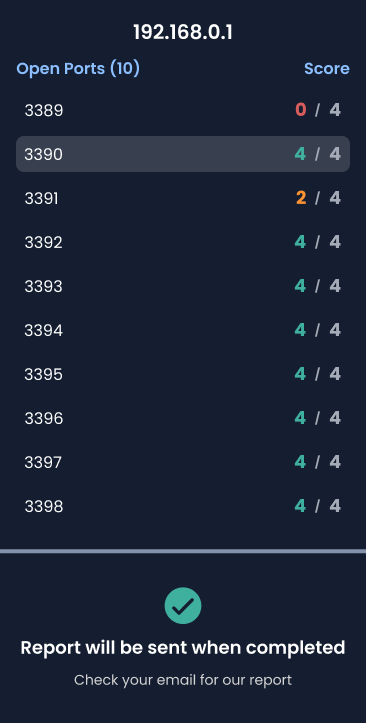
RDP Inspector scans an IP address or hostname to determine whether RDP services are publicly reachable, which ports are open, and how they are configured. It tests the security posture of the RDP endpoint — including SSL/TLS cipher strength, certificate validity, RDP encryption level, and NTLM authentication exposure — and returns a scored assessment.

RDP Inspector performs passive external assessment only. It probes for open ports and reads service banners — it does not attempt authentication or access the host.

How it works

  1. 1 Enter an IP address or DNS name
  2. 2 The scanner probes for open RDP ports (3389 and alternates)
  3. 3 Identified services are tested for configuration and cipher support
  4. 4 A scored security report is sent to your email
RDP Inspector scan result showing open ports and security scores

TruGrid SecureRDP Toolkit — Diagnostics and Troubleshooting for SecureRDP

A single-executable diagnostic toolkit for TruGrid SecureRDP deployments. Run connectivity probes, monitor live RDP session quality, analyze logs, and apply one-click fixes — without needing to share raw logs or navigate Event Viewer. Available for Windows and macOS.

Windows

SecureRDP Toolkit — Windows

Full diagnostic and remediation suite. Includes live RDP session quality monitoring, log analysis, and one-click fixes for the most common SecureRDP issues.

TruGrid SecureRDP customers
  • Broker Reachability and Connector Reachability checks
  • Host Event Check: scans Windows RDP event logs
  • Network Monitor: sustained per-layer latency probing
  • Read Logs and Cross-Reference Logs across all components
  • Live RDP Session Quality: FPS, RTT, bandwidth, frame drops
  • UDP Transport check and one-click enable
  • Trust TruGrid signing cert · Fix Connector install issues
Download for Windows →
macOS

SecureRDP Toolkit — macOS

Diagnostic scripts bundled into a native signed macOS app, with a menu bar session tracker. No terminal required.

TruGrid SecureRDP customers
  • Connector Reachability, Network Monitor, Trace Route
  • Menu bar item showing active RDP session count and names
  • Click any session to bring its window to focus
  • Live output view while diagnostics run
  • Recent Reports list with sort and delete
  • Focus Active Session button in the main window
Download for macOS →

Toolkit At a Glance

Connectivity Diagnostics

Connector Reachability, Broker Reachability (Windows), Network Monitor, and Trace Route cover every layer — TLS handshake to TruGrid endpoints, sustained latency probing, and hop-by-hop path mapping to the Frontend and relay.

RDP Session Quality

Live RemoteFX metrics: FPS in/out, RTT, bandwidth, and frame drops for active sessions. Capture Report records a 60-second window and produces an HTML report with a green/amber/red verdict. (Windows)

Log Analysis

Read Logs surfaces recent warnings and errors from Sentry, Secure Connect, and Connector logs. Cross-Reference Logs correlates events across all three sources onto a single timeline with auto-categorized failure patterns. (Windows)

One-Click Fixes

Enable UDP Transport, trust the TruGrid RDP signing certificate, and fix Connector installation issues — each with a confirmation step and an audit log of every change made. (Windows)

TruGrid
Privacy Overview

This website uses cookies so that we can provide you with the best user experience possible. Cookie information is stored in your browser and performs functions such as recognising you when you return to our website and helping our team to understand which sections of the website you find most interesting and useful.